
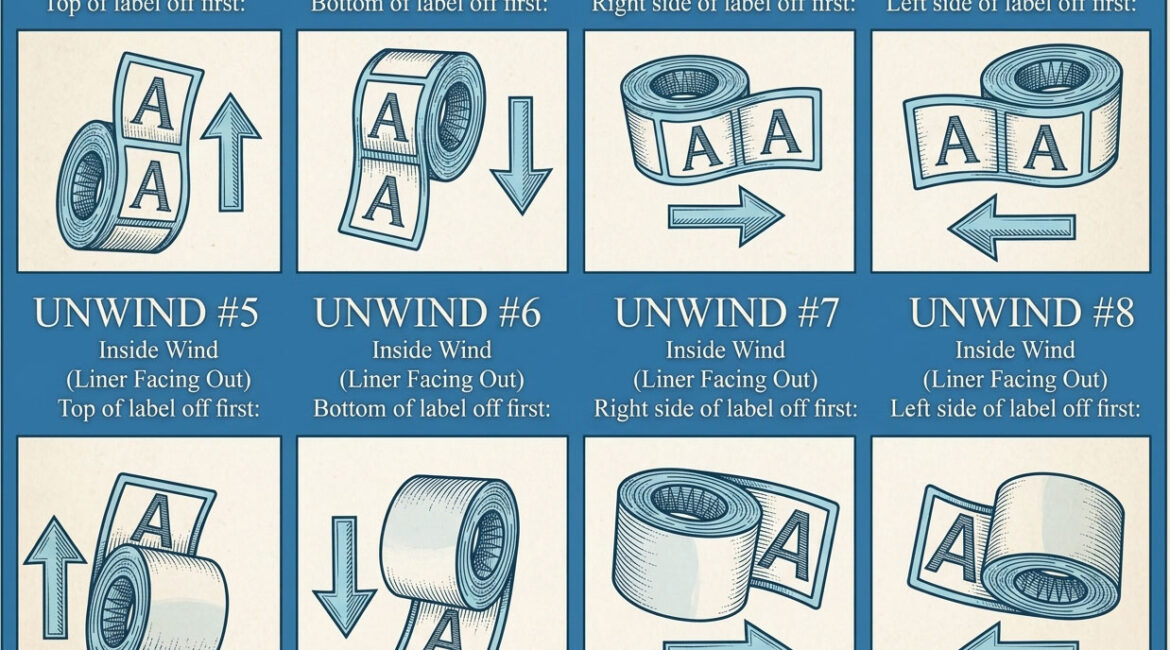
If you use a label applicator — semi-automatic or fully automatic — your labels must be wound on the roll in a specific direction so they feed correctly into the machine. This is called the “unwind direction,” and getting it wrong means your entire roll is oriented backwards or upside down in the applicator.
What Is Unwind Direction?
Unwind direction describes the orientation of the label on the roll as it unwinds. It’s defined by which edge of the label leads as the roll unfurls. The industry standard uses numbered positions — typically #1 through #8 — each representing a different combination of label orientation relative to the roll’s unwinding direction.
How to Determine Yours
Check your label applicator’s documentation for the required unwind direction — it’s usually specified as a number (#1, #3, #4, etc.) or described as “top of label leading” or “bottom of label leading” with the face in or face out. If you don’t have the documentation, take a current roll that works correctly in your machine and note the label orientation as it feeds.
Does It Matter for Hand Application?
If you’re peeling and applying labels by hand, unwind direction doesn’t matter functionally — you can rotate the roll however you like. However, most people find it more natural to peel labels with a specific orientation, so even hand-appliers sometimes have a preference.
Getting It Right
When you place a label order, always specify your unwind direction if you’re using any kind of applicator. If you’re unsure, ask your applicator manufacturer or contact your label printer for guidance. It’s a simple specification that prevents a frustrating and easily avoidable problem.
When building your label at LabelSwift, you’ll select your unwind direction as part of the configuration process.
